

[Dec-2024] Free CPC-SEN Exam Questions CPC-SEN Actual Free Exam Questions
Verified CPC-SEN dumps and 53 unique questions
NEW QUESTION # 21
In large-scale environments, it is important to enable the CPM to focus its search operations on specific Safes instead of scanning all Safes it sees in the Vault. How is this accomplished?
- A. AllowedSafes Parameter on each platform policy
- B. MaxConcurrentConnection parameter on each platform policy
- C. Administration > Options > CPM Scanner.
- D. Administration Options > CPM Settings
Answer: A
Explanation:
In large-scale environments, to enable the Central Policy Manager (CPM) to focus its search operations on specific Safes instead of scanning all Safes it sees in the Vault, the AllowedSafes parameter on each platform policy is used. This parameter can be configured within the platform settings in the CyberArk administration interface. By specifying safes in the AllowedSafes parameter, the CPM will only manage credentials within those designated safes, thereby optimizing performance and managing resources more efficiently by not scanning unnecessary safes. This setting is crucial for large environments where the CPM needs to be as efficient as possible due to the volume of managed accounts.
NEW QUESTION # 22
What is a requirement when installing the PSM on multiple Privileged Cloud Connector servers?
- A. All PSMs in the environment must be configured to use load balancing.
- B. Additional Privilege Cloud Connector servers cannot have CPM installed.
- C. In-domain servers cannot be used when deploying multiple PSM servers.
- D. Each PSM must have the same path to the same recordings directory.
Answer: D
Explanation:
When installing the Privileged Session Manager (PSM) on multiple servers, it is required that each PSM installation has the same path to the same recordings directory. This is necessary to ensure that session recordings are stored consistently across different PSM instances, which is important for high availability and load balancing implementations, as well as for maintaining a unified audit trail.
Reference:
CyberArk documentation on installing multiple PSM servers
NEW QUESTION # 23
You are deploying a CyberArk Identity Connector to integrate Privilege Cloud Shared Services with an Active Directory environment. Which requirement must be met?
- A. The Identity Connector Server must be joined to the Active Directory.
- B. The Identity Connector must be installed using Domain Administrator credentials.
- C. The Server must be a member of the root domain of the Active Directory forest.
C The Identity Connector must be installed on a Domain Controller.
Answer: A
Explanation:
When deploying a CyberArk Identity Connector to integrate Privilege Cloud Shared Services with an Active Directory environment, the server hosting the Identity Connector must meet specific requirements to ensure proper integration and functionality. The necessary condition is:
The Identity Connector Server must be joined to the Active Directory (Option A). This requirement ensures that the server can communicate effectively with the Active Directory services and manage identity data securely and efficiently. Being part of the Active Directory domain facilitates authentication and authorization processes required for the connector to function correctly.
NEW QUESTION # 24
You want to change the default PSM recordings folder path on the Privilege Cloud Connector Arrange the steps to accomplish this in the correct sequence.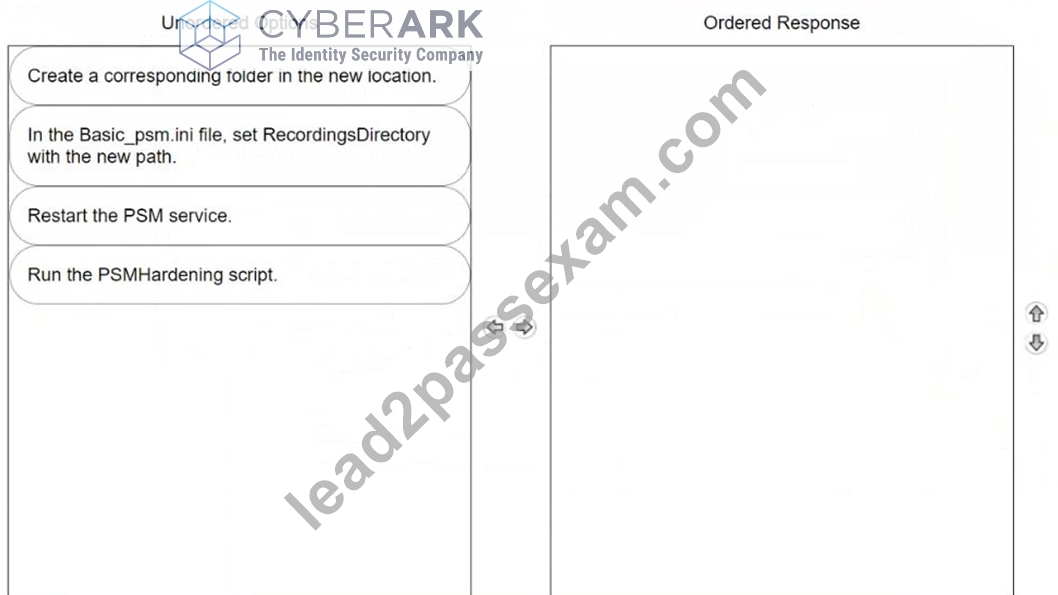
Answer:
Explanation: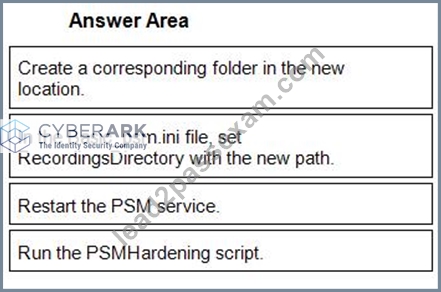
1 - Create a corresponding folder in the new location.
2 - In the Basic_psm.ini file, set RecordingsDirectory with the new path.
3 - Restart the PSM service.
4 - Run the PSMHardening script.
NEW QUESTION # 25
Which option correctly describes the authentication differences between CyberArk Privilege Cloud and CyberArk PAM Self-Hosted?
- A. Both use the same authentication methods.
- B. CyberArk Privilege Cloud requires on-premises components for all authentication and does not support other cloud-based authentication protocols; CyberArk PAM Self-Hosted offers a wide array of methods, including support for SAML. OIDC. and other modern protocols, without needing on-premises components.
- C. CyberArk Privilege Cloud only provides a username and password authentication without third-party IdP integration; CyberArk PAM Self-Hosted uses traditional on-premises methods such as Windows and LDAP. but lacks modern protocols such as SAML or OIDC.
- D. CyberArk Privilege Cloud uses cloud-based methods, integrating with CyberArk Identity for MFA. and supports SAML and OIDC; CyberArk PAM Self-Hosted depends on on-premises methods such as RADIUS and LDAP, but can adopt SAML or OIDC with additional setups.
Answer: D
Explanation:
The correct description of the authentication differences between CyberArk Privilege Cloud and CyberArk PAM Self-Hosted is that CyberArk Privilege Cloud uses cloud-based methods, integrating with CyberArk Identity for Multi-Factor Authentication (MFA), and supports SAML and OIDC, while CyberArk PAM Self-Hosted relies on on-premises methods such as RADIUS and LDAP, but can adopt SAML or OIDC with additional setups. CyberArk Privilege Cloud is designed to leverage modern cloud-based authentication protocols to enhance security and ease of use, particularly in distributed and diverse IT environments. In contrast, CyberArk PAM Self-Hosted offers flexibility to use traditional on-premises authentication methods but also supports modern protocols if configured to do so.
NEW QUESTION # 26
A support team has asked you to provide the previous password for an account that had its password recently changed by the CPM. In which tab within the account's overview page can you retrieve this information?
- A. Versions
- B. Activities
- C. Details
- D. Overview
Answer: A
Explanation:
To retrieve the previous password for an account that had its password changed by the CPM, you should look under the Versions tab within the account's overview page. This tab maintains a history of password changes, including previous passwords, along with other historical data points that allow for tracking changes over time. This feature is critical for auditing and rollback purposes in environments where knowing past credentials is necessary for troubleshooting or compliance.
NEW QUESTION # 27
You plan to install Privilege Cloud Connectors on your AWS and Azure environments.
What is the maximum number of concurrent RDP/SSH sessions that each connector can handle for Large Implementations?
- A. 1-10
- B. 0
- C. 31-60
- D. 1
Answer: C
Explanation:
For large implementations of CyberArk Privilege Cloud Connectors in AWS and Azure environments, each connector can handle between 31-60 concurrent RDP/SSH sessions. This capacity is specified in the CyberArk documentation concerning Privilege Cloud Connectors and their scalability options. It is designed to support a higher volume of concurrent sessions to meet the needs of larger enterprise environments, ensuring that multiple users can securely access resources without significant performance degradation.
NEW QUESTION # 28
In large-scale environments, it is important to enable the CPM to focus its search operations on specific Safes instead of scanning all Safes it sees in the Vault. How is this accomplished?
- A. AllowedSafes Parameter on each platform policy
- B. MaxConcurrentConnection parameter on each platform policy
- C. Administration > Options > CPM Scanner.
- D. Administration Options > CPM Settings
Answer: A
Explanation:
In large-scale environments, to enable the Central Policy Manager (CPM) to focus its search operations on specific Safes instead of scanning all Safes it sees in the Vault, the AllowedSafes parameter on each platform policy is used. This parameter can be configured within the platform settings in the CyberArk administration interface. By specifying safes in the AllowedSafes parameter, the CPM will only manage credentials within those designated safes, thereby optimizing performance and managing resources more efficiently by not scanning unnecessary safes. This setting is crucial for large environments where the CPM needs to be as efficient as possible due to the volume of managed accounts.
NEW QUESTION # 29
When installing the PSM and CPM components on the same Privilege Cloud Connector, what should you consider when hardening?
- A. CPM settings override the PSM settings when referring to the same parameter
- B. PSM settings override the CPM settings when referring to the same parameter.
- C. They can only be installed on the same Privilege Cloud Connector when installed 'out of Domain'.
- D. They can only be installed on the same Privilege Cloud Connector when installed 'in Domain'.
Answer: B
Explanation:
When installing the PSM and CPM components on the same Privilege Cloud Connector and considering the hardening process, it's important to note that PSM settings override the CPM settings when referring to the same parameter. This hierarchy is crucial in ensuring that the more stringent security settings required by PSM, which typically handles direct interaction with end-user sessions, take precedence over CPM settings. This setup helps maintain robust security practices by applying the most restrictive configuration where conflicts occur.
NEW QUESTION # 30
Following the installation of the PSM for SSH server, which additional tasks should be performed? (Choose 2.)
- A. Package all installation log files for upload to CyberArk.
- B. Delete the vault.ini you used during installation.
- C. Delete the psmpparms file you used during installation.
- D. Delete the user.cred file used during installation.
Answer: C,D
Explanation:
Following the installation of the PSM for SSH server, certain security and cleanup tasks are crucial to secure the environment and eliminate potential vulnerabilities:
Delete the user.cred file used during installation (A): The user.cred file contains sensitive credential information used during the installation process. Deleting this file post-installation ensures that this sensitive data is not left accessible on the system, mitigating the risk of unauthorized access.
Delete the psmpparms file you used during installation (C): Similar to the user.cred file, the psmpparms file often contains parameters that might include sensitive configuration details. Removing this file after the installation process is completed helps in securing the server by removing potential leakage points of sensitive information.
These actions are part of best practices to secure the installation environment and reduce the risk of sensitive information exposure.
NEW QUESTION # 31
When installing the first CPM within Privilege Cloud using the Connector Management Agent, what should you set the Installation Mode to in the CPM section?
- A. Default
- B. Primary
- C. Passive
- D. Active
Answer: D
Explanation:
When installing the first CyberArk Privilege Management (CPM) instance in the Privilege Cloud using the Connector Management Agent, the installation mode should be set to "Active". This configuration sets the CPM to be actively involved in password management and task processing without being in a standby or passive mode. Here are the step-by-step details:
Download the Connector Management Agent: Obtain the installer from the CyberArk Marketplace or your installation kit.
Run the Installer: Start the setup and select the CPM component to install.
Choose Installation Mode: When prompted, select "Active" as the installation mode. This sets up the CPM as the primary node responsible for handling password management operations.
This setup ensures that the CPM is immediately active and capable of handling requests without waiting for manual intervention or failover.
NEW QUESTION # 32
Refer to the exhibit.
You set up your LDAP Directory in CyberArk Identity, but encountered an error during the connection test.
Which scenarios could represent a valid misconfiguration? (Choose 2.)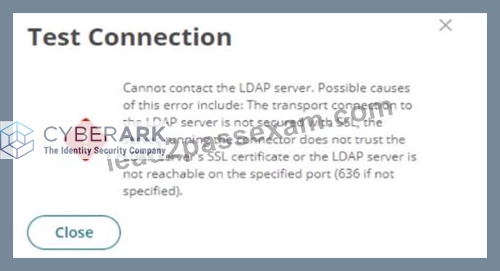
- A. TCP Port 636 could be blocked by a network firewall, preventing communication between the CyberArk Identity Connector and the LDAP Server.
- B. All required CA Certificates have been installed on the CyberArk Identity Connector but the LDAP Bind credentials provided are incorrect.
- C. TCP Port 636 could be blocked by a network firewall, preventing communication between the Secure Tunnel and the LDAP Server.
- D. Verify Server Certificate' is activated but the provided hostname is not listed as a Subject Alternative Name (SAN) in the LDAP server's certificate.
Answer: A,D
Explanation:
From the error message provided, two likely scenarios could represent valid misconfigurations:
TCP Port 636 could be blocked by a network firewall, preventing communication between the CyberArk Identity Connector and the LDAP Server (A). This is a common issue where firewall settings prevent the secure communication port (typically 636 for LDAPS) from transmitting data between the server and the connector, thus blocking the connection attempt.
'Verify Server Certificate' is activated but the provided hostname is not listed as a Subject Alternative Name (SAN) in the LDAP server's certificate (C). This scenario occurs when SSL/TLS security measures are stringent, requiring that the hostname used to connect to the LDAP server must match one listed in the server's SSL certificate. If the hostname does not match, the connection will fail due to SSL certificate validation errors.
NEW QUESTION # 33
Which statement is correct regarding the LDAP integration with CyberArk Privilege Cloud Standard?
- A. For certificate trust to your directory server, only the Issuing CA certificate is required.
- B. You must track the expiration date of the directory server certificate and contact CyberArk Support to renew it.
- C. The top-level domain entry of the directory must be unique in the chosen Privilege Cloud region.
- D. LDAPS integration with Privilege Cloud requires StartTLS for secure and encrypted communication.
Answer: A
Explanation:
For LDAP integration with CyberArk Privilege Cloud Standard, the correct statement is that only the Issuing CA certificate is required for certificate trust to your directory server. This setup simplifies the process of establishing a trusted connection between CyberArk and the LDAP server by necessitating only the certification of the issuing Certificate Authority (CA), rather than needing multiple certificates from different levels of the trust chain. This approach ensures that the SSL/TLS communication between CyberArk and the LDAP server is secured based on the trust of the issuing CA's certificate.
NEW QUESTION # 34
After a scripted installation has successfully installed the PSM, which post-installation task is performed?
- A. The PSMAdminConnect user password is reset.
- B. The screen saver for the PSM local users is disabled.
- C. A new group called PSMShadowUsers is created.
- D. Remote desktop services are installed.
Answer: B
Explanation:
After the successful scripted installation of the Privileged Session Manager (PSM), one of the post-installation tasks is to disable the screen saver for the PSM local users. This is done to ensure that the PSMConnect and PSMAdminConnect users, which are created during the installation process, do not have a screen saver activated that could interfere with the operation of the PSM.
Reference:
CyberArk documentation on PSM post-installation tasks1.
CyberArk documentation on disabling the screen saver for PSM local users
NEW QUESTION # 35
Arrange the steps to failover to the passive CPM in the correct sequence.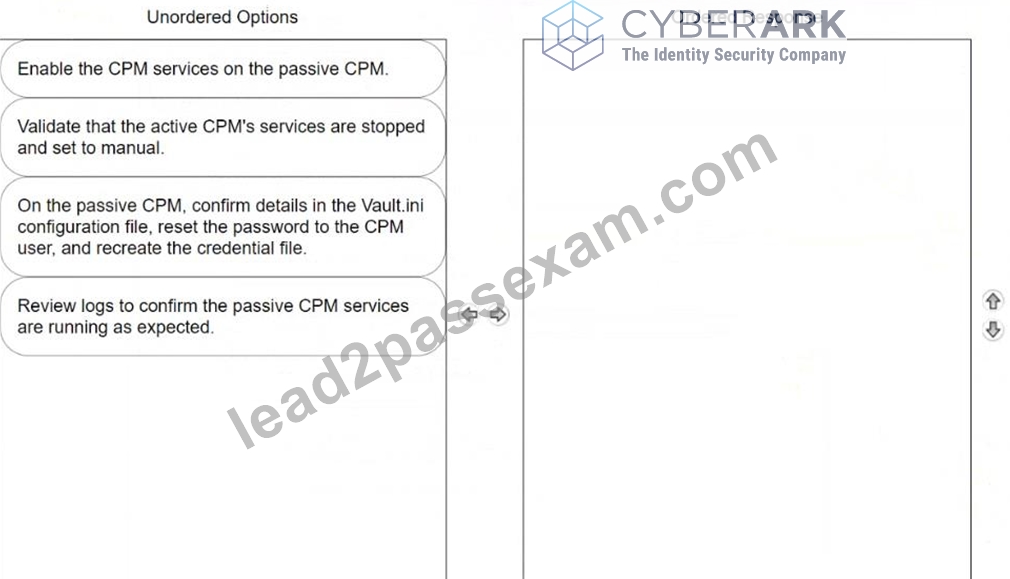
Answer:
Explanation: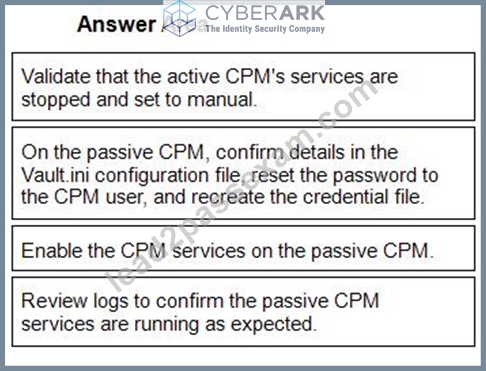
1 - Validate that the active CPM's services are stopped and set to manual.
2 - On the passive CPM, confirm details in the Vault.ini configuration file, reset the password to the CPM user, and recreate the credential file.
3 - Enable the CPM services on the passive CPM.
4 - Review logs to confirm the passive CPM services are running as expected.
NEW QUESTION # 36
Before the hardening process, your customer identified a PSM Universal Connector executable that will be required to run on the PSM. Which file should you update to allow this to run?
- A. PSMAppConfig.xml
- B. PSMHardening.xml
- C. PSMConfigureAppLocker.xml
- D. PSMConfigureHardening xml
Answer: C
Explanation:
To allow a PSM Universal Connector executable to run on the PSM after the hardening process, you should update the PSMConfigureAppLocker.xml file. This file configures AppLocker, which is a feature that controls which apps and files users can run on a system. Including the necessary executable in the PSMConfigureAppLocker.xml ensures it is whitelisted by AppLocker policies, thus permitted to execute even under the hardened security settings of the PSM environment. Reference to this configuration can be found in the CyberArk Privilege Session Manager implementation documentation, specifically in sections detailing customization and security hardening of environment configurations.
NEW QUESTION # 37
......
Latest 100% Passing Guarantee - Brilliant CPC-SEN Exam Questions PDF: https://www.lead2passexam.com/CyberArk/valid-CPC-SEN-exam-dumps.html
CPC-SEN Dumps for Pass Guaranteed - Pass CPC-SEN Exam: https://drive.google.com/open?id=1TilVjJ_JryjHuGBEnB86nrrIYkhwuBpp