

[Aug-2026] Latest Palo Alto Networks SD-WAN-Engineer Certification Practice Test Questions
Verified SD-WAN-Engineer Dumps Q&As - 1 Year Free & Quickly Updates
Palo Alto Networks SD-WAN-Engineer Exam Syllabus Topics:
| Topic | Details |
|---|---|
| Topic 1 |
|
| Topic 2 |
|
| Topic 3 |
|
| Topic 4 |
|
| Topic 5 |
|
NEW QUESTION # 35
A network engineer is able to ping and traceroute from SD-WAN branch IP 192.168.1.123 to servers in primary data center - DC1, but is unable to ping or traceroute to a server 10.2.2.22 in the newly configured secondary data center, DC2.
The DC2 ION device is advertising the branch IP subnet 192.168.1.0/24 to the DC2 core via eBGP Core Peer.
The DC2 data center site has site prefix 10.2.2.0/23 configured.
Which configuration will resolve the issue in this scenario?
- A. The default 0.0.0.0/0 static route to the DC2 ION pointing to the DC2 next hop.
- B. Reconfigure eBGP Core Peer to iBGP Core Peer.
- C. Remove site prefix 10.2.2.0/23 from DC2 site configuration.
- D. Reconfigure eBGP Core Peer as Edge Peer type.
Answer: A
Explanation:
In a Prisma SD-WAN deployment, the routing of traffic between branches and Data Centers (DCs) relies on the proper synchronization between the AppFabric (the overlay) and the local routing protocols (the underlay
/LAN side). In this scenario, the branch can successfully reach DC1, indicating the branch ION is correctly participating in the fabric. However, traffic to DC2 (10.2.2.22) is failing.
The DC2 site has the site prefix 10.2.2.0/23 configured. In Prisma SD-WAN, defining a site prefix informs the Controller that this specific subnet "belongs" to that site, causing the Controller to advertise reachability for this prefix to all other ION devices in the fabric. Consequently, when the branch ION (192.168.1.123) attempts to reach 10.2.2.22, it correctly identifies DC2 as the destination and encapsulates the traffic toward the DC2 ION.
The bottleneck occurs once the packet arrives at the DC2 ION. While the ION is advertising the branch subnet (192.168.1.0/24) to the DC Core (ensuring the return path), the ION itself must know how to forward the incoming traffic from the branch to the internal DC network. If the DC2 ION does not have a specific route in its local routing table for the 10.2.2.0/23 subnet pointing to the DC Core's internal interface, the packet will be dropped.
According to Palo Alto Networks best practices for Data Center ION deployment, a static default route (0.0.0.0/0) should be configured on the ION device pointing toward the DC Core's next-hop IP address. This ensures that any traffic received from the AppFabric destined for internal DC resources-which are not directly connected to the ION-is successfully handed off to the core switching fabric for final delivery.
Adding this default route (Option A) resolves the reachability issue by providing the "last-hop" routing instruction within the DC.
NEW QUESTION # 36
An ION 3000 device at a remote branch has suffered a critical hardware failure and must be replaced via the RMA process. The administrator has received the replacement unit.
What is the correct procedure to transfer the configuration and license from the defective unit to the replacement unit to ensure minimal downtime and retention of historical data?
- A. Backup the configuration of the old device to a USB drive and restore it to the new device using the local console.
- B. Use the "Replace Device" workflow in the Prisma SD-WAN portal, which automatically transfers the configuration (Device Shell) and re-associates the site to the new serial number.
- C. Delete the old device from the portal, create a new site for the replacement device, and rebuild the policies manually.
- D. Manually configure the new device from scratch, then open a support ticket to transfer the license.
Answer: B
Explanation:
Comprehensive and Detailed Explanation
The RMA replacement process in Prisma SD-WAN is designed to be seamless, leveraging the decoupling of logical configuration from physical hardware.
* Replace Device Workflow: The administrator should use the "Replace Device" (or RMA) function within the portal. This workflow allows you to select the "Defective" device (old serial) and the
"Replacement" device (new serial).
* Configuration Transfer: Once executed, the system automatically binds the existing Device Shell (which contains all interface configs, routing policies, and site associations) to the new hardware's serial number. The new device, once connected to the internet, will "call home," identify itself, and download the exact configuration of the previous unit.
* License Transfer: While the configuration moves automatically, the Support License transfer typically requires a specific step in the Customer Support Portal (CSP) or happens automatically if processed as a formal RMA order. Options A and D are incorrect because they involve manual reconfiguration, which is unnecessary and error-prone. Option C is incorrect as the ION platform relies on cloud-based config management, not local USB backups for hardware swaps.
NEW QUESTION # 37
Which action meets the needs of an organization that requires elevated incident notifications for its headquarters location?
- A. Export syslog to an external syslog collector and mark all messages as "Critical."
- B. Implement performance policy specifically for the site with very aggressive service-level agreement (SLA) thresholds.
- C. Enable an event policy rule for the site with the action to set priority to the highest available level.
- D. Enable SNMPv3 trap notifications to an external network management system.
Answer: C
Explanation:
In the Prisma SD-WAN (Instant-On Network) management framework, administrators can customize how events are handled and prioritized across different sites through Event Policies. An organization that requires
"elevated incident notifications" for a critical site like its headquarters needs a way to differentiate those alerts from standard branch notifications in the management portal and integrated third-party tools.
The most direct and effective method to achieve this is by configuring an Event Policy Rule specifically for the headquarters site. Within the incident policy framework, administrators can create rules that match specific resources-in this case, the headquarters site-and apply an action to set the priority. Priority levels typically range from P1 (highest) to P5 (lowest).1 By setting these to the highest level (P1), any generated incident for that site will immediately stand out on the dashboard as a high-priority event.
This approach is superior to other options because it changes the inherent importance of the alert within the Prisma SD-WAN logic itself. For example, a "WAN Link Down" event at a small retail branch might be a P3, but the same event at the HQ could be elevated to a P1 via a custom policy rule. This elevation ensures that the Network Operations Center (NOC) is alerted more urgently and that external integrations, such as ServiceNow or PagerDuty, receive the correct priority mapping for immediate escalation. Options such as aggressive SLA thresholds (Option B) only increase the frequency of alerts, not necessarily their notification priority, while global syslog or SNMP settings (Options A and D) lack the site-specific granularity required for this use case.
NEW QUESTION # 38
A network engineer is troubleshooting a "Voice Quality" issue. They suspect that the DSCP markings are being stripped or altered by the ISP.
Which tool in the Prisma SD-WAN portal allows the engineer to capture live packets on the WAN interface and inspect the IP header ToS/DSCP field?
- A. Path Quality Monitor
- B. Event Logs
- C. Flow Browser
- D. Packet Capture (PCAP)
Answer: D
Explanation:
Comprehensive and Detailed Explanation
To validate specific packet-level details like DSCP (Differentiated Services Code Point) values, header checksums, or exact payload sizes, a Packet Capture (PCAP) is required.
PCAP Tool: Prisma SD-WAN provides a built-in PCAP utility accessible directly from the portal. The engineer can select the specific Interface (e.g., Internet 1), apply a Filter (e.g., port 5060 or host 1.2.3.4), and capture the traffic.
Analysis: The resulting .pcap file can be downloaded and opened in Wireshark. This allows the engineer to definitively see if the packets leaving the ION have DSCP EF (46) and if the packets arriving (if capturing on the other side) still retain that marking, or if the ISP has bleached it to CS0 (0).
Flow Browser (A): While it shows "Application" and metrics, the Flow Browser typically displays the assigned priority class, not necessarily the raw bit-level DSCP value present in the packet header on the wire.
NEW QUESTION # 39
During the Zero Touch Provisioning (ZTP) process of a new ION device at a branch site, which interface ports are supported by default to request an IP address via DHCP and reach the Prisma SD-WAN controller for claiming?
- A. Only the USB port via a cellular modem
- B. Only the dedicated Controller port (if available)
- C. The dedicated Controller port, or Port 1 / Internet 1 if a dedicated port is absent
- D. Any LAN or WAN port on the device
Answer: C
Explanation:
Comprehensive and Detailed Explanation
For a successful Zero Touch Provisioning (ZTP) experience, the ION device must be able to obtain an IP address and reach the internet immediately upon boot-up.
According to Palo Alto Networks hardware guides, the Controller Port (often labeled specifically as
"CONTROLLER" on models like the ION 3000/7000/9000) is pre-configured to act as a DHCP client by default. It is the preferred interface for the initial "call home" process.
However, for smaller desktop models (like the ION 1000/2000/1200 series) or scenarios where a dedicated management network is not available, the device firmware is also configured to attempt DHCP client requests on Port 1 (often labeled as Internet 1 or simply 1).
Connecting the ISP circuit to any random port (like Port 4 or a LAN port) will not work for ZTP because those interfaces are not pre-configured as DHCP clients in the factory default state. Therefore, the installer must ensure the internet uplink is connected to either the dedicated Controller port or Port 1/Internet 1 to ensure the device can resolve the controller FQDN and download its configuration.
NEW QUESTION # 40
Which metrics can be monitored at the individual Prisma SD-WAN ION device level to assess its health and operational performance?
- A. Device application flow statistics, Autonomous Digital Experience Manager (ADEM) metrics, and site health score
- B. Device VPN tunnels and controller reachability status
- C. Device software version and interface bandwidth
- D. Device CPU, memory and disk use, interface bandwidth, and errors/discards
Answer: D
Explanation:
To ensure the stability and performance of the SD-WAN fabric, Prisma SD-WAN provides granular visibility into the health of each Instant-On Network (ION) appliance. While the solution is primarily application- defined, monitoring the underlying physical and system resources of the hardware or virtual instance is critical for proactive maintenance and troubleshooting.
At the individual device level, administrators can monitor system resource utilization, which includes CPU usage, memory (RAM) consumption, and disk space availability.1 High CPU or memory usage can indicate that the device is reaching its throughput limits or that a specific process (such as deep packet inspection) is overtaxing the system. Disk utilization is monitored to ensure there is sufficient space for local logs and system operations.
Beyond internal system health, interface-level metrics are essential. This includes monitoring interface bandwidth utilization to identify bottlenecks on WAN or LAN ports. Crucially, operational performance is also assessed through error and discard counters on each interface. High error rates or frequent packet discards often signal physical layer issues (like bad cabling), duplex mismatches, or upstream provider congestion. While VPN status and application flows are vital for network-wide visibility, the core health of an ION device is defined by these foundational system and interface metrics.
Monitoring these specific parameters allows network engineers to distinguish between an application performance issue caused by network latency and one caused by a local hardware resource constraint.
NEW QUESTION # 41
Return traffic for an application from the branch is being dropped on the branch ION. Application traffic arrives via SD-WAN internet overlay at the branch, and path policy for the application at the branch has the following settings:
Active = MPLS Overlay
Backup = Prisma Access on internet
Which branch configuration is the probable cause of this behavior?
- A. It has Prisma Access tunnel over MPLS circuit but not on the internet circuit.
- B. It has no MPLS circuit, and the Prisma Access tunnel is down.
- C. It has one MPLS and one internet circuit.
- D. It has two internet circuits and no MPLS circuit.
Answer: D
Explanation:
In Prisma SD-WAN, path selection and traffic symmetry are governed by the Path Policy and the available physical/virtual circuits at a site. The scenario describes a situation where return traffic is dropped on the branch ION after arriving via an Internet overlay. To understand why, we must analyze the "Active" and
"Backup" paths defined in the policy.
The policy specifies Active = MPLS Overlay and Backup = Prisma Access on internet. In a healthy environment, the ION device expects to send and receive traffic based on these defined paths. If the site actually has two internet circuits and no MPLS circuit (Option C), a critical mismatch occurs. Because there is no MPLS circuit available to satisfy the "Active" path, the device will fall back to the "Backup" path for initiated traffic.
However, the core issue here relates to how Prisma SD-WAN handles asymmetric routing and session state.
If traffic arrives at the branch via an "Internet Overlay" path that is not explicitly defined or allowed as a valid path for that specific application in the Path Policy, the ION device's flow integrity checks may drop the packets. Specifically, if the ION is configured with only Internet circuits but the policy is looking for an MPLS overlay that doesn't exist, the device may fail to correctly associate the return packets with the session state if the paths are perceived as "unbound" or "invalid" per the policy. This behavior is a security feature designed to ensure that traffic only traverses paths that meet the administrator's defined performance and security criteria. Without an MPLS circuit present, the policy cannot be fully realized, leading to potential drops for traffic arriving on paths not intended for that specific application flow.
NEW QUESTION # 42
A network installer is at a remote branch site to deploy a new ION 3000 device. The device has been racked, cabled to the internet, and powered on. The installer has the "Claim Code" displayed on the email sent by the administrator.
When the administrator enters this Claim Code into the Prisma SD-WAN portal, what is the immediate status of the device before the configuration is fully pushed?
- A. Provisioned
- B. Active
- C. Claimed
- D. Online
Answer: C
Explanation:
Comprehensive and Detailed Explanation
In the Prisma SD-WAN (CloudGenix) Zero Touch Provisioning (ZTP) lifecycle, the device status transitions through specific stages that indicate its readiness and connectivity.
When an administrator enters the Claim Code (or Serial Number/Claim Code pair) into the portal, the device status immediately updates to "Claimed".
This status confirms that the portal has registered the device's unique identity and associated it with the customer's tenant. However, "Claimed" does not necessarily mean the device is fully operational or passing traffic yet. It simply signifies that the ownership is verified.
Once the physical device at the site successfully connects to the internet and reaches the Prisma SD-WAN Controller (using the call-home function), it will authenticate using its installed certificate. Upon successful authentication and the establishment of the secure control channel, the status will transition from "Claimed" to "Online".
Only after the device is "Online" can the controller push the specific site configuration (Device Shell), policies, and IP addressing required for the device to become "Provisioned" and eventually "Active" in the data path. If the device remains in the "Claimed" state for an extended period, it indicates that the hardware has not yet successfully contacted the controller, which prompts troubleshooting of the physical internet circuit or firewall rules upstream.
NEW QUESTION # 43
A customer wants to deploy Prisma SD-WAN ION devices at small home offices that use consumer-grade broadband routers. These routers typically use Symmetric NAT and do not allow static port forwarding.
Which standard mechanism does Prisma SD-WAN utilize to successfully establish direct Branch-to-Branch (Dynamic) VPN tunnels through these Symmetric NAT devices?
- A. STUN (Session Traversal Utilities for NAT)
- B. SSL VPN encapsulation
- C. UPnP (Universal Plug and Play)
- D. Manual GRE Tunnels
Answer: A
Explanation:
Comprehensive and Detailed Explanation
Prisma SD-WAN utilizes STUN (Session Traversal Utilities for NAT) to facilitate NAT Traversal for its Secure Fabric overlay.
Discovery: When an ION device connects to the internet behind a NAT router, it reaches out to the Prisma SD-WAN Controller. The controller acts as a STUN server, identifying the public IP address and port that the ION's traffic is originating from.
Symmetric NAT Challenge: In Symmetric NAT, the mapping changes for every destination. However, the Prisma SD-WAN architecture is designed to handle this by having the controller coordinate the connection attempt.
Hole Punching: The controller shares the discovered public mapping information between two peer ION devices. They then simultaneously initiate traffic to each other's public IP/Port (a technique called "UDP Hole Punching"). This tricks the intermediate NAT devices into allowing the inbound traffic, establishing a direct P2P IPSec tunnel without requiring manual port forwarding or static IPs at the edge.
NEW QUESTION # 44
In the Prisma SD-WAN portal, an administrator is viewing the "Media" analytics for a branch site to troubleshoot complaints about poor voice quality.
When calculating the Mean Opinion Score (MOS) for voice traffic, which two metrics does the system prioritize active monitoring for, even when no user voice traffic is present on the link? (Choose two.)
- A. Packet Loss
- B. Jitter
- C. Latency (One-Way)
- D. Throughput
Answer: A,B
Explanation:
Comprehensive and Detailed Explanation
Prisma SD-WAN calculates the Mean Opinion Score (MOS) to provide a standardized metric (1-5) for voice quality. To ensure the system always knows the "voice readiness" of a path-even before a call starts-it uses Active Probes (synthetic UDP packets).
While latency is measured, the MOS calculation algorithm is most heavily penalized by Packet Loss (D) and Jitter (B).
Packet Loss: Even a small amount of loss (e.g., >1%) dramatically reduces voice clarity, causing dropouts.
Jitter: High variance in packet arrival time (jitter) causes the "robotic" voice effect and buffer underruns.
The system continuously measures these specific metrics on all WAN links using synthetic probes. If the packet loss or jitter exceeds the threshold defined in the "Path Quality Profile" (e.g., Voice Profile), the path is marked as non-compliant, and the MOS score drops, triggering a policy action to move the flow. Throughput (C) is less critical for voice as calls consume very little bandwidth (e.g., 64-100 Kbps), making congestion (loss/jitter) the primary enemy, not raw speed.
NEW QUESTION # 45
A network installer is at a remote branch site to deploy a new ION 3000 device. The device has been racked, cabled to the internet, and powered on. The installer has the "Claim Code" displayed on the email sent by the administrator.
When the administrator enters this Claim Code into the Prisma SD-WAN portal, what is the immediate status of the device before the configuration is fully pushed?
- A. Provisioned
- B. Active
- C. Claimed
- D. Online
Answer: C
Explanation:
Comprehensive and Detailed Explanation
In the Prisma SD-WAN (CloudGenix) Zero Touch Provisioning (ZTP) lifecycle, the device status transitions through specific stages that indicate its readiness and connectivity.
When an administrator enters the Claim Code (or Serial Number/Claim Code pair) into the portal, the device status immediately updates to "Claimed".
This status confirms that the portal has registered the device's unique identity and associated it with the customer's tenant. However, "Claimed" does not necessarily mean the device is fully operational or passing traffic yet. It simply signifies that the ownership is verified.
Once the physical device at the site successfully connects to the internet and reaches the Prisma SD-WAN Controller (using the call-home function), it will authenticate using its installed certificate. Upon successful authentication and the establishment of the secure control channel, the status will transition from "Claimed" to
"Online".
Only after the device is "Online" can the controller push the specific site configuration (Device Shell), policies, and IP addressing required for the device to become "Provisioned" and eventually "Active" in the data path. If the device remains in the "Claimed" state for an extended period, it indicates that the hardware has not yet successfully contacted the controller, which prompts troubleshooting of the physical internet circuit or firewall rules upstream.
NEW QUESTION # 46
An administrator has configured a Path Policy for "ERP_Traffic". The policy allows two public internet links,
"ISP-A" and "ISP-B", both marked as "Active". The Path Quality Profile (SLA) requires a latency of less than
150ms. Currently, both ISP-A and ISP-B have a latency of 40ms, well within the SLA.
How does the Prisma SD-WAN ION determine which link to use for a new flow of "ERP_Traffic" when both active paths meet the SLA requirements?
- A. It duplicates the packets across both paths (Packet Duplication) to ensure delivery.
- B. It selects the path with the highest available bandwidth capacity.
- C. It selects the path that appears first in the interface configuration list.
- D. It selects the path with the lowest numerical latency (e.g., if ISP-A drops to 39ms).
Answer: B
Explanation:
Comprehensive and Detailed Explanation
Prisma SD-WAN utilizes a sophisticated decision engine for Application-Based Path Selection that goes beyond simple failover. When configuring a Path Policy, the administrator defines "Active" paths and a "Path Quality Profile" (SLA).
* SLA Compliance (The Filter): First, the system filters the available paths based on the Path Quality Profile. In this scenario, both ISP-A and ISP-B have 40ms latency against a 150ms threshold. Both are
"green" or compliant paths.
* Selection Criteria (The Tie-Breaker): When multiple paths are configured as "Active" and all meet the performance SLA, the ION device aims to optimize the overall user experience and network utilization. The default behavior for load balancing across healthy, compliant active paths is to select the path with the highest available bandwidth capacity.
By steering new flows to the link with the most "headroom" (available Mbps), the system prevents the saturation of a smaller link (e.g., a 20Mbps DSL line) while a larger link (e.g., 1Gbps Fiber) sits underutilized.
This maximizes the aggregate throughput for the site. While latency is the qualifier, bandwidth availability is often the selector for compliant paths. Note that if the application was defined as "Real-Time" and configured for packet duplication, behavior would differ, but for standard traffic, capacity-based distribution is the standard active/active logic.
NEW QUESTION # 47
Which statements accurately describes how the Prisma SD-WAN zone-based firewall functions within a branch network?
- A. East-west traffic between the zones can be explicitly blocked, but traditional Access Control List (ACLs) are required to block north-south traffic.
- B. North-south traffic (internet/WAN egress) is handled by zone-based firewall and relies on external firewalls for east-west segmentation.1
- C. North-south traffic is handled by application-aware policies, while east-west traffic requires traditional Access Control List (ACLs).
- D. Security zones enable granular control over both WAN-to-LAN and LAN-to-WAN as well as east-west (LAN-to-LAN) traffic flows within the branch.
Answer: D
Explanation:
The Prisma SD-WAN (ION) device includes a native, application-aware Zone-Based Firewall (ZBFW) that provides comprehensive security within the branch without the mandatory requirement for additional hardware.2 The fundamental principle of this architecture is the grouping of interfaces and sub-interfaces into logical Security Zones.3 Once these zones are defined (e.g., LAN, WAN, Guest, IoT), the administrator can create security policies that govern the traffic permitted to flow between them.4 Unlike traditional routers that rely on stateless Access Control Lists (ACLs) which are difficult to manage and lack application visibility, the Prisma SD-WAN ZBFW is stateful and application-aware.5 This means it can apply granular control over North-South traffic (flows moving between the LAN and the WAN/Internet) and East-West traffic (flows moving between different segments within the LAN, such as from a Guest zone to a Corporate zone).6 By using security zones, an ION device can ensure that even if two local networks are connected to the same physical appliance, they remain completely isolated unless a specific policy explicitly allows communication.
This "Zero Trust" approach at the branch edge allows organizations to segment vulnerable devices (like IoT) from critical internal resources and strictly control how users access the internet or the corporate data center.7 The ZBFW works in tandem with the global controller to ensure that security postures are consistent across all branch locations, eliminating the complexity of manual ACL management at each site.8
NEW QUESTION # 48
An ION 3000 device at a remote branch has suffered a critical hardware failure and must be replaced via the RMA process. The administrator has received the replacement unit.
What is the correct procedure to transfer the configuration and license from the defective unit to the replacement unit to ensure minimal downtime and retention of historical data?
- A. Backup the configuration of the old device to a USB drive and restore it to the new device using the local console.
- B. Use the "Replace Device" workflow in the Prisma SD-WAN portal, which automatically transfers the configuration (Device Shell) and re-associates the site to the new serial number.
- C. Delete the old device from the portal, create a new site for the replacement device, and rebuild the policies manually.
- D. Manually configure the new device from scratch, then open a support ticket to transfer the license.
Answer: B
Explanation:
Comprehensive and Detailed Explanation
The RMA replacement process in Prisma SD-WAN is designed to be seamless, leveraging the decoupling of logical configuration from physical hardware.
Replace Device Workflow: The administrator should use the "Replace Device" (or RMA) function within the portal. This workflow allows you to select the "Defective" device (old serial) and the "Replacement" device (new serial).
Configuration Transfer: Once executed, the system automatically binds the existing Device Shell (which contains all interface configs, routing policies, and site associations) to the new hardware's serial number. The new device, once connected to the internet, will "call home," identify itself, and download the exact configuration of the previous unit.
License Transfer: While the configuration moves automatically, the Support License transfer typically requires a specific step in the Customer Support Portal (CSP) or happens automatically if processed as a formal RMA order. Options A and D are incorrect because they involve manual reconfiguration, which is unnecessary and error-prone. Option C is incorrect as the ION platform relies on cloud-based config management, not local USB backups for hardware swaps.
NEW QUESTION # 49
When integrating Prisma SD-WAN with Prisma Access, what is the specific role of the Service Connection (SC)?
- A. It is the peering link between different Prisma Access regions to optimize global traffic.
- B. It is the SSL VPN portal used by mobile users to connect to the network.
- C. It is the IPSec tunnel that connects a Branch site to the Prisma Access gateway for internet access.
- D. It connects the Prisma Access cloud infrastructure back to the customer's Headquarters or Data Center for access to internal private resources (e.g., AD, DNS, Intranet).
Answer: D
Explanation:
Comprehensive and Detailed Explanation
In the Prisma Access architecture (integrated with SD-WAN), distinct connection types serve different purposes.
Remote Networks: These are the connections from your Branch sites (using ION devices) into the cloud. They allow branches to get to the internet or other branches.
Service Connections (SC): This is a specialized high-bandwidth connection used to bridge the Prisma Access Cloud to your Private Data Center or Headquarters.
The primary use case for a Service Connection (Option A) is to allow mobile users and branch users (who are connected to the Prisma cloud) to reach private, centralized resources that still reside on-premise, such as Active Directory controllers, legacy databases, or mainframes. Without a Service Connection, users in the cloud would be able to reach the internet and each other, but not the servers physically located in your HQ data center. The CloudBlade automates the creation of these tunnels, but architecturally, the "Service Connection" is the "cloud-to-HQ" bridge.
NEW QUESTION # 50
An administrator wants to configure a Path Policy that routes all "Guest Wi-Fi" traffic directly to the internet using the local broadband interface, bypassing all VPN tunnels.
Which Service & DC Group setting should be selected in the policy rule to achieve this "Direct Internet Access" (DIA) behavior?
- A. Standard VPN
- B. Any-Private
- C. Direct
- D. Default-Cluster
Answer: C
Explanation:
Comprehensive and Detailed Explanation
In Prisma SD-WAN Path Policies, the Service & DC Group (Destination) field determines where the traffic is sent.
* Direct: This is the specific keyword/object used to instruct the ION to route traffic directly out to the local WAN interface (Local Breakout) towards the Internet, without encapsulation in a VPN tunnel.
This is the correct setting for Guest Wi-Fi, SaaS applications (like Office 365), or any public web browsing that does not need to be backhauled.
* Standard VPN / Default-Cluster: These options direct traffic into an IPSec overlay tunnel destined for a Data Center or another ION. Selecting these would "backhaul" the guest traffic, which contradicts the requirement for DIA.
When "Direct" is selected, the ION uses its available "Internet" category links. The policy can further specify which internet link to use (e.g., "Use Broadband, avoid LTE") via the path preference list, but the Destination type must be "Direct".
NEW QUESTION # 51
Based on the HA topology image below, which two statements describe the end-state when power is removed from the ION 1200-S labeled "Active", assuming that the ION labeled "Standby" becomes the active ION? (Choose two.)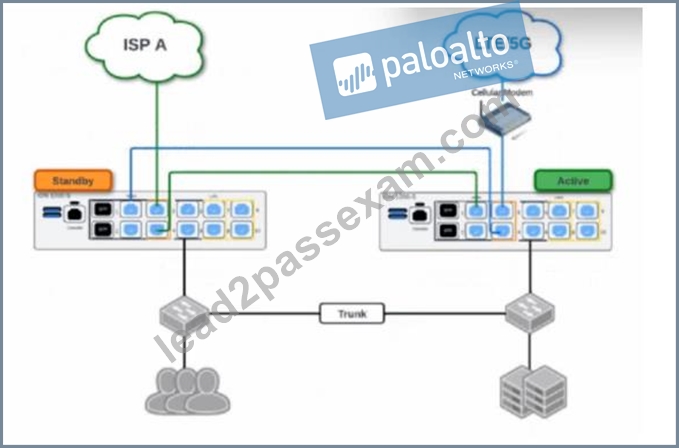
- A. Both the connection to ISP A and the connection to LTE/5G will be usable.
- B. The connection to ISP A will be usable, but the connection to LTE/5G will not.
- C. The newly active ION will send a gratuitous ARP to the LAN for the IP address of any SVIs.
- D. The VRRP Virtual IP address assigned to any SVIs will be moved to the newly active ION.
Answer: A,C
Explanation:
Comprehensive and Detailed Explanation at least 150 to 250 words each from Palo Alto Networks SD-WAN Engineer documents:
Prisma SD-WAN High Availability (HA) for branch ION devices, particularly the Gen-2 ION 1200-S, is designed to provide "100% WAN Capacity" preservation during a hardware or power failure. This is achieved through the use of Bypass Pairs (Fail-to-Wire). In the provided topology, the ISP A and LTE/5G circuits are cross-connected using the bypass ports (typically ports 3 and 4 on the ION 1200-S).
When the "Active" ION device loses power, the internal physical relays in its bypass ports transition to a closed state, effectively creating a physical bridge between the ports. In this scenario, the LTE/5G signal-which enters the Active ION's port 4-is mechanically bridged to port 3, allowing it to pass through to port 4 of the Standby ION. Simultaneously, ISP A is already connected to the Standby ION. Consequently, once the Standby device completes its transition to the "Active" state, it has physical access to both WAN circuits, validating Statement A.
Regarding the LAN transition, Prisma SD-WAN does not use standard VRRP for ION-to-ION HA; instead, it uses a proprietary Control Plane HA mechanism. When the failover occurs, the newly active ION takes over the IP addresses of all configured Switch Virtual Interfaces (SVIs) and LAN interfaces. To ensure the downstream Layer 2 infrastructure (like the LAN switches shown in the diagram) updates its MAC address tables to point to the new physical hardware for those IPs, the newly active ION immediately broadcasts a Gratuitous ARP (GARP). This ensures that LAN traffic is correctly steered to the new device without a significant timeout, validating Statement C.
NEW QUESTION # 52
A network operator receives a critical SITE_CONNECTIVITY_DOWN alarm for a branch site in the Prisma SD-WAN portal.
What specific condition triggers this alarm type?
- A. The site has exceeded its licensed bandwidth capacity.
- B. One of the two internet circuits at the site has gone down.
- C. All Secure Fabric Links (VPNs) to all remote peers are down, isolating the site from the overlay.
- D. The device has lost power and rebooted.
Answer: C
Explanation:
Comprehensive and Detailed Explanation
The SITE_CONNECTIVITY_DOWN alarm is a high-severity alert indicating a total loss of overlay connectivity for a site.
It does not trigger if just one circuit fails (Option B), provided that other circuits are still up and maintaining VPNs. A single link failure would typically trigger a "Link Down" or "VPN Down" alarm, but the Site connectivity would remain "Up" (degraded).
It does not simply mean the device rebooted (Option A), although a reboot would cause it temporarily; the alarm specifically tracks the state of the VPN fabric.
The SITE_CONNECTIVITY_DOWN alarm specifically generates when all Secure Fabric Links (VPN tunnels) on the device are in the "Down" state. This means the branch is completely isolated from the rest of the SD-WAN network (Data Centers and other branches), even if the device itself might still be powered on and reachable via the controller (management plane). It signifies a "Blackout" of the data plane for that location.
NEW QUESTION # 53
What is the basis for calculating the minimum bandwidth subscription required for branch IONs?
- A. Maximum traffic (ingress and egress) passing through the ION device
- B. Amount of traffic which will traverse the SD-WAN secure fabric
- C. ISP circuit capacity at the branch location
- D. Maximum throughput supported by the ION hardware deployed at data center locations
Answer: A
Explanation:
Palo Alto Networks utilizes an aggregate throughput model for Prisma SD-WAN licensing.1 The minimum bandwidth subscription required for a branch ION is determined by the maximum traffic (the sum of both ingress and egress) that passes through the ION device. This is often referred to as "Aggregate Throughput." It is a critical distinction in the Prisma SD-WAN architecture because the license must account for all traffic processed by the device, whether that traffic stays local (Direct Internet Access), goes to the Data Center via the VPN fabric, or moves between local LAN segments.
When sizing a subscription, engineers must evaluate the total capacity of the WAN circuits connected to the branch. For example, if a branch has two 100 Mbps internet circuits, the device is capable of processing 200 Mbps of egress traffic and 200 Mbps of ingress traffic simultaneously. However, the licensing is based on the aggregate peak throughput the customer expects to utilize across the device's interfaces.
Choosing an under-sized subscription based only on "fabric traffic" (Option B) or "ISP capacity" (Option D) without considering the total bi-directional flow can lead to artificial performance bottlenecks. If the traffic exceeds the licensed bandwidth, the ION device will police the traffic to the licensed limit, regardless of the physical port speed or the hardware's theoretical maximum. Therefore, the subscription must be aligned with the total actual traffic volume the device is expected to handle to ensure an optimal user experience and full utilization of available circuit bandwidth.
NEW QUESTION # 54
An administrator is configuring a High Availability (HA) pair of ION 3000 devices at a Data Center.
Which statement accurately describes the requirement for the HA Control Interface connection between the two devices?
- A. The HA Control interface must be a direct physical connection or a Layer 2 adjacent connection on a dedicated VLAN, with no routing between them.
- B. The HA Control interface uses the management port and must be connected to the internet.
- C. The HA Control interface must be connected via a Layer 3 routed network to ensure reachability across different subnets.
- D. The HA Control connection is optional if both devices are managed by the same Cloud Controller.
Answer: A
Explanation:
Comprehensive and Detailed Explanation
In a Prisma SD-WAN High Availability (HA) deployment, the HA Control Interface is the critical lifeline used to synchronize state, heartbeats, and flow information between the Active and Standby ION devices.
The strict requirement for this connection is that it must be Layer 2 adjacent.
Best Practice: A direct physical cable connection between the designated HA ports of the two devices (e.g., Port 2 on Device A to Port 2 on Device B).
Alternative: Connectivity through a switch on a dedicated, isolated VLAN is supported, provided the devices are in the same broadcast domain and subnet.
Routing (Layer 3) is not supported for the HA Control link because the keepalive mechanism relies on low-latency, multicast/broadcast-level adjacency to detect failures instantly (sub-second failover). If the HA link were routed (Option A), network latency or router convergence issues could cause "Split-Brain" scenarios where both devices assume the Active role, leading to IP conflicts and traffic loops. Option C is incorrect because the Controller is too slow to manage real-time failover; the decision must be local.
NEW QUESTION # 55
......
Latest 2026 Realistic Verified SD-WAN-Engineer Dumps - 100% Free SD-WAN-Engineer Exam Dumps: https://www.lead2passexam.com/Palo-Alto-Networks/valid-SD-WAN-Engineer-exam-dumps.html
Get 2026 Updated Free Palo Alto Networks SD-WAN-Engineer Exam Questions and Answer: https://drive.google.com/open?id=1e3m_Z-vAYKngsSpJ6kNzsnhN_FUhbn6Z